The chat nobody picked up
A lead writes at 2pm. One rep is driving to a visit, the other thinks he has it. By the time anyone looks, the buyer booked a competitor.
FOR FIELD SALES
Your reps keep their WhatsApp. You see the minutes, the unanswered chats and the cold leads.

HOW LEADS GO COLD
They report the deals they closed. Nobody reports the chats that sat.
A lead writes at 2pm. One rep is driving to a visit, the other thinks he has it. By the time anyone looks, the buyer booked a competitor.
A chat waiting 45 minutes shows up in no report. The slow rep never hears about it, and neither do you.
Your clients, quotes and history live in one rep's pocket. He quits, you start from zero.
No complaint, no call. Your rep doesn't mention it, and the buyer goes to someone else.
BY INDUSTRY
Real estate, field sales, car dealerships. Same leak, different desk.
REP MONITORING
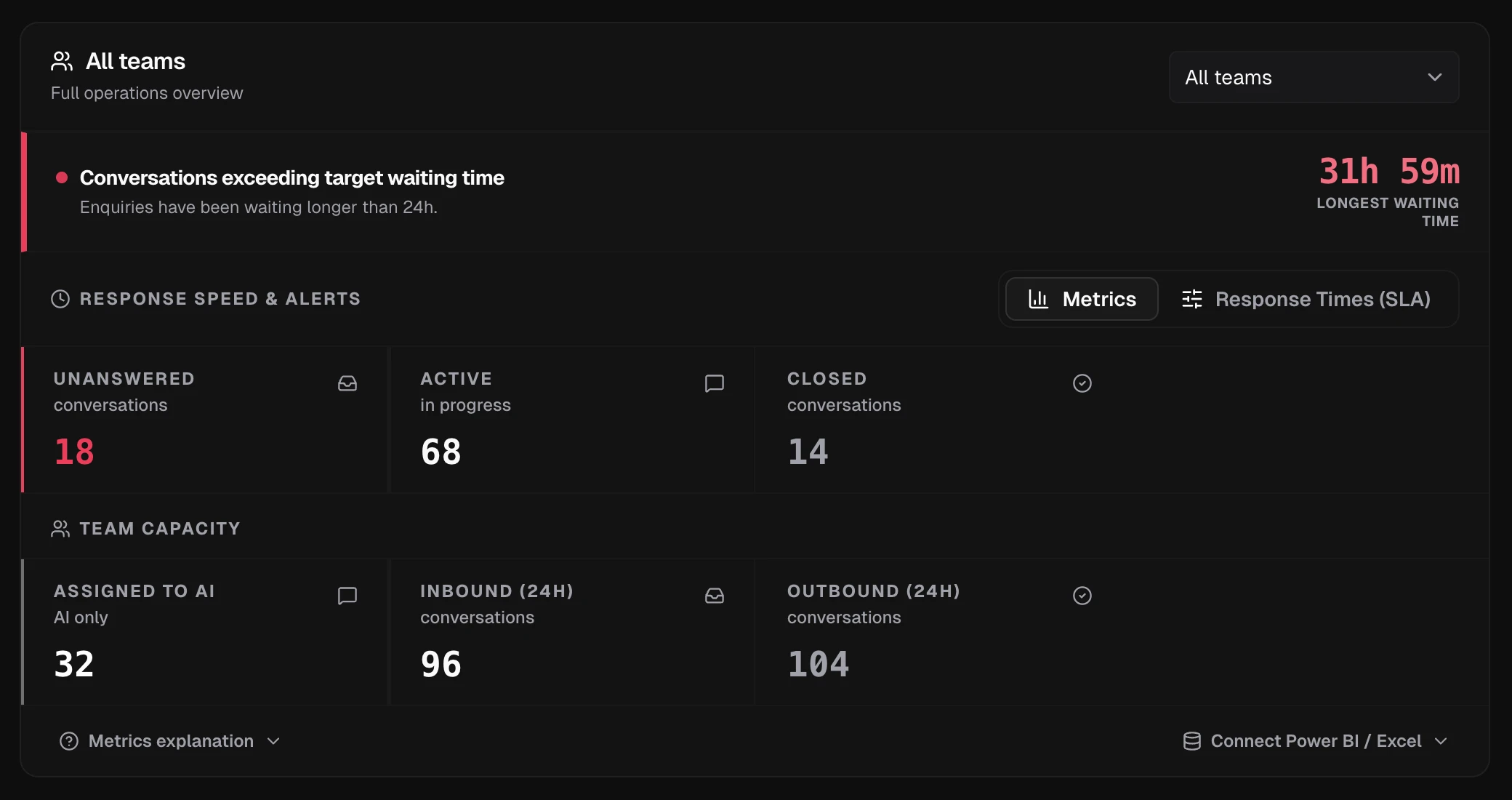
Reps keep their WhatsApp. You get the dashboard. Longest wait, unanswered chats and who is handling each one, without asking anyone for a report.
Chats past the wait limit you set turn red, with the longest wait on top. No screenshots, no asking.
See how many chats nobody has answered and filter them before the buyer books elsewhere.
The line is yours. Contacts and chats stay in your workspace when a rep leaves. Connect your own storage to keep older history for good.
HOW IT WORKS
Your reps keep WhatsApp. You keep the oversight.
Add the rep's name and the company WhatsApp Business number they already answer on.
The number stays on the rep's phone. No porting, no new app. The rep never logs into Levvo.
Every conversation, who owns it, and the minutes since the last reply, across the whole team.
ASK ANY AI ABOUT LEVVO
Send one question to three AIs and read what each of them answers about Levvo.
FAQ
Everything you need to know about tracking response times and managing chats with Levvo.
No. They keep the WhatsApp app they already use and scan a QR code once. No new app, no password, no training. They never log into Levvo.
Yes. This is business visibility on numbers the company owns: the team works the channel inbox and the owner sees the conversations and their response times. It is not a tool for reading somebody's personal phone.
Every message is timestamped as it arrives. Each chat shows the minutes since the last reply, with the rep it belongs to. Put each rep on their own line and team, and the daily report breaks the numbers down by team.
In the dashboard, yes: a red banner flags chats past the wait limit you set and shows the longest wait. You set that limit hourly, and there is no push or email. It is a panel you look at, not a siren, next to filters for unassigned, unanswered and ai chats.
Partly. There is a daily report with your response-time numbers that tools like Excel or Power BI can read with some setup (up to a month at a time, not CSV). There is no one-click connector.
Their chats stay in the workspace with their contacts and notes. Deactivating a rep keeps the assigned conversations and the history, and you hand the chats to whoever picks them up.
Yes. Connect each company number as its own line. The dashboard lists the chats from every line, with their wait minutes, in one place.
They should not. The conversation happens in WhatsApp and Levvo reads the numbers from there. No data entry, and nothing for a rep to forget to update.
No. Linking a number by QR keeps it on the rep's phone and works for small teams. A Cloud API number is also supported for higher volume, but it lives on Meta's platform instead of the rep's phone.
respond.io unifies chat, calls, email and social in one team inbox with AI agents, built for high volume, and it works through the WhatsApp Business API. Levvo covers one channel: your reps keep the WhatsApp they already use, and you see the minutes since each reply and who is handling each chat.
It is the gap between a lead writing and a rep answering. Levvo timestamps every message and shows how long each chat has been waiting for a reply, plus the longest wait across the team.
Recent messages sit in Levvo's cache. Connect your own Cloudflare R2 or Amazon S3 bucket and older conversations are archived there under your own retention policy. Without your own bucket, history is kept only for a limited time.
WAIT TIMES · ONE DASHBOARD
“I sold CRMs and multichannel platforms for years. Every rollout died the same way: reps refused to live inside a helpdesk. So Levvo changes nothing for them. They answer on the WhatsApp they already have. What changes is for you: the minutes since each reply, on one screen.”

No credit card required. Keep your existing number. Live in 2 minutes.